


By John De Goes
You're deep in a feature branch. Your editor has twelve tabs open across four files. Tests are running in a split pane. Your coding agent is halfway through implementing a data validation layer — it's been working for three minutes and it's almost done.
Then a Slack message: "Can you take a quick look at that bug on main?"
You know what comes next. git stash. Switch branches. Your editor state vanishes. The agent's context is gone. The test output disappears. You fix the bug — it takes ten minutes. Then you switch back, git stash pop, reopen the files, re-run the tests, restart the agent, and try to remember where you were.
This has always been painful. But it used to be the whole story. You'd lose five minutes of context, mutter something under your breath, and get back to work. It was a tax on your time, and you paid it because there was no other way.
That's not the whole story anymore.
Coding agents have fundamentally shifted what a single developer can accomplish in a day. An agent can implement a feature end-to-end while you review a PR on another branch. You can have one agent refactoring a module while you pair with another agent on a different part of the codebase. Work that used to be sequential — finish this, then start that — can now happen in parallel.
The bottleneck moved. It used to be "how fast can I type." Now it's "how many workstreams can I keep in flight at once."
But git's model hasn't changed. One repository, one working directory, one branch checked out at a time. Your tools — editor, terminal, agent — are all anchored to that single directory. Every time you switch branches, you tear down one workspace and rebuild another. Every context switch kills an agent session. Every branch switch wipes your editor state. The opportunity cost isn't just the five minutes of re-orientation — it's the parallel workstream you could have kept running but didn't.
The ceiling on your productivity isn't the agent. It's the workspace model.
That's the thing — parallel work isn't technically impossible today. Git worktrees have existed since git 2.5. tmux has been around for decades. You could wire them together manually and get most of the way there.
But you don't. Not really. Not as your default.
Because the ceremony is just high enough that you negotiate with yourself every time. "This task is small, I'll just stash." "I'll branch after I finish this." "I don't want to set up a whole new tmux session for a quick fix." You know the right thing to do. You just don't do it, because the overhead doesn't feel worth it in the moment.
Multiple clones are worse — they waste disk, remotes drift, and you lose the shared reflog. Living with the context-switch tax is what most people actually do. That was tolerable when you were doing one thing at a time. It's not tolerable when you have three agents ready to work three branches and you can only occupy one.
The winning workflow isn't the most powerful one. It's the one with so little friction that you stop weighing the tradeoff at all.
That's the idea behind zproj. It treats the worktree, the branch, the tmux window, and the 3-pane layout as a single lifecycle object — created together, torn down together, switched between without disturbing anything.
It combines three things that already exist — bare git worktrees, tmux sessions, and AI coding agents — into a standardized structure where parallel workstreams are the default, not a special occasion.
Bare git worktrees give each branch its own physical directory, all sharing one underlying repository. Your main branch lives in my-project/main/. Your feature branch lives in my-project/feature-auth/. They share history, remotes, and refs, but their working trees are completely independent.
tmux sessions provide the workspace layer. zproj creates one tmux session per project and one window per worktree. Each window has a 3-pane layout: your coding agent on the left, your editor top-right, and a shell bottom-right. All three panes open in the worktree directory automatically.
Tool resolution is handled for you. zproj auto-discovers your coding agent — it checks for opencode, claude, codex, amp, aider, goose, and gemini in that order — and your editor via $ZPROJ_EDITOR, then $EDITOR, then falls back to nvim or vim. Override either with an environment variable, or run zproj --env to see what it resolved.
When you leave a window, you're not tearing anything down. You're just looking somewhere else. The agent keeps going. The editor stays open. The processes keep running. You didn't switch branches — you switched workspaces, and the workspace persisted.
zproj is a single bash script with no dependencies beyond git (2.5+) and tmux (3.0+). There's a small amount of one-time setup, and then everything happens inside tmux.
Clone the repo and symlink the script into your PATH:
# Replace /path/to/zproj by where you want to store the repo:
git clone https://github.com/jdegoes/zproj /path/to/zproj

# Create a symbolic link in some place on the PATH
# (or add the directory to your PATH):
ln -s /path/to/zproj ~/.local/bin/zproj

# Verify accessibility and version:
zproj --version
Verify your environment:
zproj --diagnostics
This checks everything — bash, git, and tmux versions, editor and agent resolution, tmux server state, git identity, and more. Green checkmarks across the board means you're ready.
Set up your first project:
# From a remote repo
zproj clone git@github.com:your-org/your-project.git
cd your-project

# Or convert an existing local repo in-place
cd my-existing-project
zproj init .

# Or start fresh
zproj init my-new-project
zproj init handles all three cases — new directory, existing folder with files, or existing git repo — and normalizes to the bare worktree structure. Existing repos are upgraded in-place with full preservation of history, branches, remotes, tags, and stash.
Open the session:
zprojYou'll see the 3-pane layout for the first time. That's the setup. Everything from here happens inside tmux.
Once you're in the session, the goal is simple: creating a new workstream should take a second, switching should take zero, and cleaning up should be safe and effortless.
You start a feature:
zproj feature-auth
That single command creates the worktree, the branch, and the tmux window with all three panes — agent and editor already running in the right directory. If the worktree already exists, it just switches to it. Give the agent its task. Flip to another window. Start a second workstream:
zproj fix-schemaSame thing — new worktree, new branch, new window, everything ready. The Slack message arrives. You switch to your main window. Fix the bug. Switch back. The agent on feature-auth never stopped. The editor tabs on fix-schema are exactly where you left them.
When a feature is done:
zproj delete feature-auth
Worktree, branch, and tmux window — gone in one shot. zproj is careful here: it refuses to delete a worktree with uncommitted changes, and it refuses if the tmux window is still open, unless you pass --force. It also won't delete a branch named differently from the worktree, so there's no risk of accidentally removing main through a misnamed directory. You can create workstreams freely because you can tear them down safely.
The CLI is already fast, but the real unlock is when creating and switching workstreams stops being a conscious decision at all.
zproj integrate
This launches your coding agent in a dedicated tmux session and hands it a detailed plan to wire up both your editor and your tmux config. On the editor side, it adds keybindings for the four review actions — add note, view notes, dispatch, and clear. On the tmux side, it adds bindings so that prefix-N prompts for a name and creates the worktree, branch, and 3-pane window in one keystroke, and prefix-X tears down the current workstream with a confirmation prompt. For Neovim the editor integration works out of the box. For other editors, the agent researches the extension system and adapts.
The ergonomic endpoint: you stop "using worktrees" as a thing you remember to do. You just do it, because it's cheaper than not doing it.
If you prefer to inspect the plan before handing it off:
zproj integrate --plan
(The README also includes the raw tmux keybindings if you'd rather add them to ~/.tmux.conf manually.)
Here's where zproj goes beyond session management and into the feedback loop between you and your agent.
Your agent finished its work on feature-auth. You open the diff in your editor. You're scanning through the changes and you spot something — a missing null check in UserService.scala. You hit a keybinding and type: "Add null check for the auth token before calling the downstream service." The note is appended to a structured review notes file inside the worktree.
You keep scanning. Three more issues. Three more notes.
When you're done reviewing:
zproj review dispatch
zproj assembles your notes into a prompt, saves it to a temp file, and sends a one-line handoff message directly to the coding agent pane. It finds the right pane by name — not by index — so dispatch works correctly regardless of which window you're in. The agent picks up the file and starts implementing your feedback. You watch it work, or you flip to another window and start the next thing.
No copy-paste. No slash commands. No switching out of your diff view. The feedback loop between reviewing and implementing stays tight, and the agent gets precisely scoped, directed notes — not a vague "please fix the issues."
The notes file lives at a canonical path inside the worktree (.agents/plans/review-notes.md), but other tools should never hardcode it. They call zproj review path --abs at runtime so the path is always correct regardless of which worktree is active. zproj owns the path; your editor just asks for it.
The 3-pane layout is deliberate:
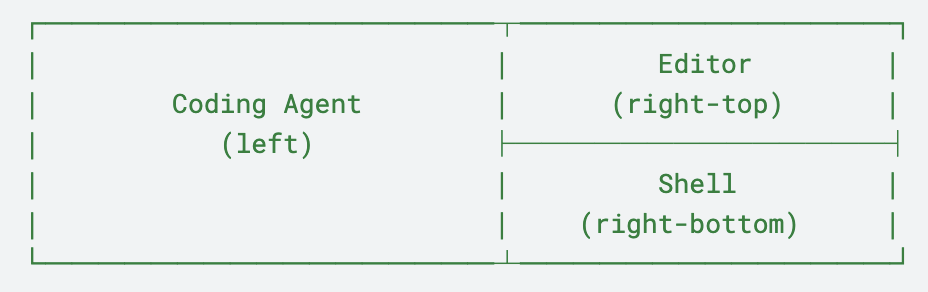
The coding agent gets the left half — it's the primary collaborator and it produces the most output. The editor sits top-right where you're reading and annotating. The shell is bottom-right for git commands, test runs, and quick checks. Every pane opens in the worktree directory. Multiply this layout by as many branches as you need.
Worktrees solve parallel directories. zproj solves parallel workstreams.
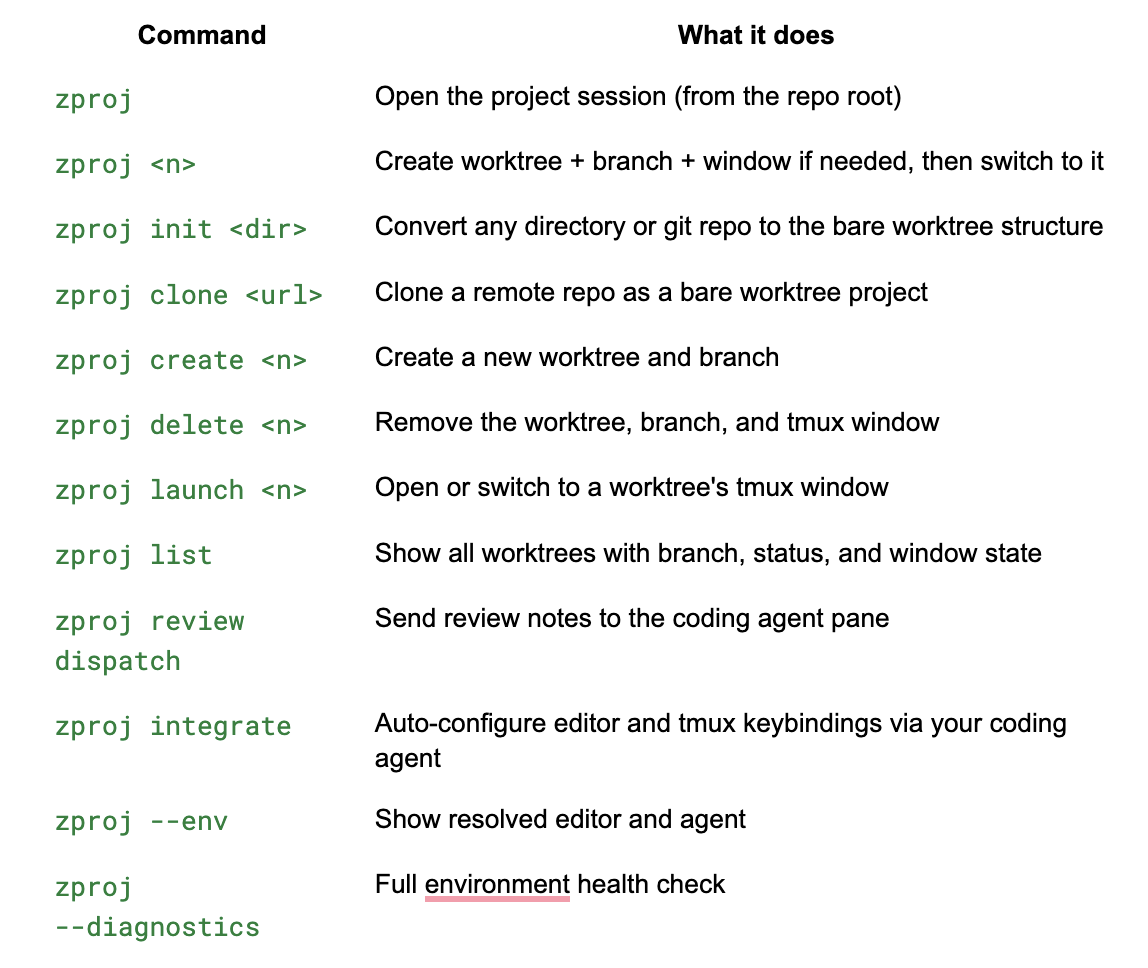
Customize with environment variables: CODING_AGENT to override the agent, ZPROJ_EDITOR to override the editor.
Same day. Same Slack message. Same bug on main.
You switch to your main window. The shell is right there, the editor already has the relevant file open from earlier. You find the bug, fix it, commit. You switch back to feature-auth. The agent is done — it finished while you were away. You open the diff, leave three review notes, dispatch them. The agent starts on the revisions.
Meanwhile, on your fix-schema window, the other agent has been quietly working this whole time.
The question was never "how do I switch branches faster." The question is "how many things can I have in flight at once?" With zproj, the answer is: as many as you need.
zproj is open-source and available at github.com/jdegoes/zproj. It's a single bash script — read it, fork it, make it yours.
Stay ahead with the latest insights and breakthroughs from the world of technology. Our newsletter delivers curated news, expert analysis, and exclusive updates right to your inbox. Join our community today and never miss out on what's next in tech.